I checked out Userlytics to see if its paid usability tests are worth your time. It is legit and pays rather well per test, but tests do not come often. Below is what I found, and which sites I recommend next to it.

Tested by Mikael (EarnWithMike)Founder and lead testerMikael founded PaidFromSurveys in 2016 and has personally tested hundreds of survey and GPT sites since then. He shows his tests and payment proof to 555K+ subscribers on his YouTube channel, EarnWithMike. He checked Userlytics himself and does not earn a commission from it.Learn more about Mikael
Last retested · First published
Legit and pays rather well per test, but tests are not regular
Usually around $5 to $20 per test, paid to PayPal with no threshold. Expect few invites and talking out loud.
On this page
The short answer
Userlytics is a legit user-testing site. It pays you to test websites and apps and give your feedback, and it pays rather well for each test.
But you cannot expect to earn from it regularly, because tests will not always be available. Your work is reviewed before you get paid, and you have to talk out loud on camera. It can be a decent secondary site, but it is not for everybody.
- User-friendly site
- Pays automatically via PayPal
- No payout threshold
- Fairly high rewards per test
- Limited earning opportunities
- Tests usually take a significant amount of time to complete
- The desktop screen recording software does not work well with external microphones
- Your test must be approved before you get paid
My experience with Userlytics
I signed up as a tester and made a video that gives you an inside look at how you earn on Userlytics. I have done many tests like this on other user-testing sites. This is what I looked at, and what I did not test.
- First checked
- May 2020Review first published May 12, 2020
- Latest retest
- Checked: tests, payouts, support
- Pay per test
- Usually around $5 to $20For a test of 20 to 40 minutes
- Paid out through
- PayPalWithin 15 days after a test is approved
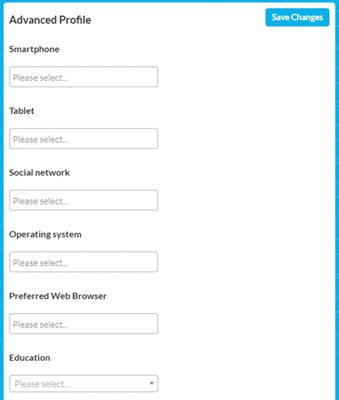
- Signing up as a tester and filling in my profile
- The member dashboard, where you see test invites and the status of your tests
- How you start a test with a code, on desktop and with the mobile app
- The FAQ and the support options
- A payout. My review does not show a payment from Userlytics.
- In-depth interviews. They do not come often.
Inside Userlytics: my video
I made a video that gives you an inside look and shows exactly how you can earn from Userlytics. The screenshots below are from the review.
Screenshots from my review
Userlytics at a glance
| What it is | User-testing site. Around since 2009. |
|---|---|
| Cost to join | Free |
| Ways to earn | Usability tests of websites and apps, and sometimes in-depth interviews |
| Pay per test | Usually around $5 to $20 for 20 to 40 minutes. Userlytics says up to $90 per test. |
| Minimum cashout | No threshold |
| Payout method | PayPal, within 15 days after your test is approved |
| What you need | A computer with a webcam and built-in microphone, and the Userlytics screen recorder for Mac or Windows |
| App | Screen recording app on Google Play and the App Store, for mobile tests |
| Minimum age | 16 |
| Where you can join | More or less globally. In some countries, tests are rare. |
| Support | FAQ page, email at support@userlytics.com, and a YouTube channel |
Is Userlytics legit and safe?
Yes, Userlytics is legit. It pays you to give feedback and test websites and apps. But it is not for everybody. Here is what you should know before you sign up.
- Tests are not regular
Userlytics does not guarantee that you receive test invites regularly. Each test has a limited number of participants, so you have to be quick. In some countries, it takes a lot of patience to find a test.
- You may have to qualify first
Some tests invite you right away. For others, you first answer a short survey to see if you qualify, and you do not get paid for that survey.
- No pay until the test is approved
The client reviews your test before you get paid. If you do not speak your thoughts loudly and clearly, your test can be rejected, and you earn nothing.
- You are on camera
You need a webcam and microphone, and the screen recorder records your face, screen and voice. Do the test in a well-lit, quiet room. External microphones often cause recording issues.
My takeThe thing I like the most about Userlytics is that it pays rather well for each test you complete. But you cannot really expect to earn from it on a regular basis. If you are comfortable talking while you work, it can serve as a decent secondary site. Just join other user-testing sites too, so you get more tests.
Userlytics tests do not come often. Join more user-testing sites to get more tests.
See the best user testing sitesHow you earn on Userlytics
There are 2 ways to earn. Usability tests are the main one. Tap one to read more.
Usability testsUsually $5 to $20
You are invited to try out a website or mobile app and give feedback. You see available tests in the member dashboard, and Userlytics emails you when there is one, so check your email regularly.
Read the instructions carefully, and speak your thoughts loudly and clearly while you test. When you are done, you submit the test for review. The dashboard shows which tests are under review, pending or approved. When your test is approved, you receive the pay promised in the invite.
Each test has a limited number of participants, so be quick.
In-depth interviewsDecent
Sometimes site owners hold live tests or in-depth interviews. You chat with the owner of the site, or a representative, and give feedback in real time. These are not common, so if you see an opening, grab it right away.
Check Out the Best User Testing Sites
How much can you make?
You usually get paid around $5 to $20 for a test that lasts 20 to 40 minutes. Longer tests pay more. Userlytics says you can earn up to $90 per test, but in my experience, you should not expect tests that pay that much very often, if ever.
How much you earn overall depends on how often you get a test. Complete your profile right away to get the most test invites. When it comes to user tests, it is always good to join other user-testing sites too, so you get access to more tests.
Overall, Userlytics has decent earning potential. You do not earn regularly, but you earn a good amount when you do.
How you get paid
| Method | Minimum | Speed |
|---|---|---|
| PayPal | No threshold | Within 15 days after your test is approved |
Your test is marked “approved” once the Userlytics client has reviewed and positively rated your feedback. You give your PayPal email when you sign up, so use a verified PayPal account.
For more sites that let you withdraw quickly, see the fastest paying sites.
How to become a Userlytics tester
Sign up as a tester on the Userlytics website. Then install the screen recording software. It works on Mac and Windows, with a different download link for each, so pick the right one.
You need a webcam. Userlytics strongly suggests a webcam with a built-in microphone, because external microphones usually cause recording issues with its software. Most webcams have one nowadays.
For mobile tests, download the Userlytics app from Google Play or the App Store. It records your screen, your voice and the front camera. You still start every test from the website or your email, with a code.
What readers told me
This review has 4 comments since 2022: 2 from readers and 2 replies from me.
A reader in 2023 found few tests, invites that filled up within minutes, and screening questions that did not lead to a test.
A reader in 2022 liked the review.
“Userlytics is a complete waste of time. They never have anything and when they do you have to answer a question right, usually not fitting. … Some of them have 5 or 6 questions so you feel like you just took a survey for free and did not get paid”
Mikael: Thanks for sharing your experiences.
Userlytics alternatives I have reviewed
| Site | Best for | Min. cashout | My rating |
|---|---|---|---|
| TestingTime | Good pay per test, but few invites | Varies by country | 3.6 / 5 |
| UserTesting | Video feedback on sites and apps | Paid per test via PayPal | 3.4 / 5 |
| User Interviews | Paid research studies, mostly for US residents | No threshold; paid per study | 3.4 / 5 |
| Trymata | Website tests, thinking out loud | Paid per approved test | 3.0 / 5 |
See also the best user testing sites. If you want a more stable way to earn, see the top survey sites in your country. They offer daily opportunities, and you will find a site you can join wherever you live.
How I scored Userlytics
I use the same 100-point system for every platform. See how I test and rate.
Userlytics scores 72 out of 100. Join it next to other user-testing sites, so you get more tests.
See the best user testing sitesUserlytics FAQ
Is Userlytics a scam?
No. Userlytics is a legit user-testing site that pays you to test websites and apps. But tests do not come regularly.
How much does Userlytics pay per test?
Usually around $5 to $20 for a test of 20 to 40 minutes. Longer tests pay more. Userlytics says up to $90 per test, but do not expect that often.
How does Userlytics pay?
Through PayPal, within 15 days after your test is approved. There is no payout threshold.
What do I need to be a tester?
A computer with a webcam, preferably with a built-in microphone, and the Userlytics screen recorder for Mac or Windows. For mobile tests, you need the Userlytics app.
Who can join Userlytics?
It is available more or less globally. You must be at least 16 years old. In some countries, it takes a lot of patience to find a test.
Can my test be rejected?
Yes. The client reviews your test before you get paid. Speak your thoughts loudly and clearly, and test in a well-lit, quiet room.
How do I contact Userlytics support?
Check the FAQ page first. Otherwise, email support@userlytics.com.
Who checked Userlytics for this review
Founder of PaidFromSurveys.com since 2016. Mikael has tested hundreds of survey and GPT sites and shares his tests with 555K+ subscribers on YouTube (October 2026).
If you have any comments, questions, or experiences with Userlytics, I would love to hear from you in a comment below.
Userlytics is a complete waste of time. They never have anything and when they do you have to answer a question right, usually not fitting. They will literally send an email for a test at 5:23 and it will be too late at 5:25 and if it is not too late you will answer the question wrong to qualify. Some of them have 5 or 6 questions so you feel like you just took a survey for free and did not get paid but it says you don’t qualify for the 10 dollar test. complete waste of signing up.
Thanks for sharing your experiences.
Awesome
Glad it helped you.