I signed up for Userfeel and explored how its website tests work. It is legit and pays well per test, but tests do not come often, and the work takes effort. Below is what I found, and which sites I recommend if you want simpler tasks.

Tested by Mikael (EarnWithMike)Founder and lead testerMikael founded PaidFromSurveys in 2016 and has personally tested hundreds of survey and GPT sites since then. He shows his tests and payment proof to 555K+ subscribers on his YouTube channel, EarnWithMike. He checked Userfeel himself and does not earn a commission from it.Learn more about Mikael
Last retested · First published
Legit user testing that pays well, but tests are rare
From $3 for a 5-minute test to $30 for 60 minutes, no threshold. Expect few tests and real work.
On this page
The short answer
Userfeel is legit. It pays you to test the websites of its partners and give feedback, and the pay per test is fairly high.
But you will usually not get access to tests very often, so it takes patience to find work. The tests are more work than surveys: you record yourself talking through a website. And if your work is not approved, you are not paid. It can be a decent site if you are good at evaluating sites. Do not expect to earn a lot quickly.
- Payment through PayPal
- Fairly high rewards per task
- No threshold: you are paid once your work is approved
- Apps for Android and iOS
- Limited earning opportunities
- Takes quite some time to get paid
- A decent amount of work per test
- The qualification test is not paid
- You need a microphone and must record your voice
My experience with Userfeel
I registered, installed the Userfeel program and explored the platform. This is what I looked at, and what I did not test.
- First tested
- November 2019Review first published Nov 8, 2019
- Latest retest
- Checked: test offers, apps, payouts, support
- Pay per test
- $3 to $30Userfeel’s listed rates, by test length
- Tests available
- Not very oftenWhat I noticed while exploring the platform
- Registering and verifying my account
- The download page for the Windows, Mac and mobile programs
- The list of available tests
- The FAQ page and the contact form
- A paid test and a payout. My review does not show that I was paid by Userfeel.
- The paid surveys, which are only in some countries
Inside Userfeel: my video
In the video below, I give you an inside look and show exactly how you can earn from Userfeel.
Screenshots from my account
Userfeel tests do not come often. These sites give you simpler tasks you can do any day.
See the best alternativesUserfeel at a glance
| What it is | Usability testing: you test partner websites and give spoken feedback. Similar to IntelliZoom. |
|---|---|
| Cost to join | Free |
| Minimum age | 18 |
| Ways to earn | Website tests, and paid surveys in some countries |
| Pay per test | $3 for 5 minutes, $10 for 20 minutes, $20 for 40 minutes, $30 for 60 minutes |
| Minimum cashout | None. You are paid once your work is approved. |
| Payout methods | PayPal, or bank account in certain countries |
| Payout speed | Around 1 week after the test. Survey earnings can take up to 6 weeks. |
| What you need | The Userfeel program for Windows or Mac, or the app for Android or iOS, and a microphone |
| Where you can join | Globally |
| Support | Detailed FAQ page and a contact form |
Is Userfeel legit and safe?
Yes, Userfeel is legit. It does what it claims: it pays you for testing websites. But that does not mean it is worth it for you. Here is what you should know.
- Tests are not frequent
You will usually not get access to tests very often, so it takes patience to find tasks. The more tests you are invited to, the more you earn.
- No approval, no pay
Userfeel reviews your work after you upload it. If your work is not approved, you are not paid. Follow the test scenario, speak loudly and clearly in a quiet place, and leave useful comments.
- An unpaid qualification test first
Before you get any tests, you must finish a sample test. It is not paid, but it gives you your first rating, and that rating decides how often you get paid tests. Take it seriously.
- You install a program and record your voice
Tests run through a program you install, and you record audio while you talk about the site. A reader noticed Userfeel processes running in the background whenever Windows started. I have not checked this myself. If you are not comfortable with this, this site is not for you.
My takeWhat mainly puts me off is that you have to do quite a lot of work to earn. The tasks are more complicated than on GPT and survey sites, and there is no guarantee you are paid, because they can reject your work. But if you are good at evaluating sites, Userfeel can be a decent site to join. It pays relatively well, and it can be a fun way to earn. Just do not expect to earn a lot quickly.
How you earn on Userfeel
There are 2 ways to earn. Website tests are the main one. Tap one to read more.
Website tests$3 to $30 per test
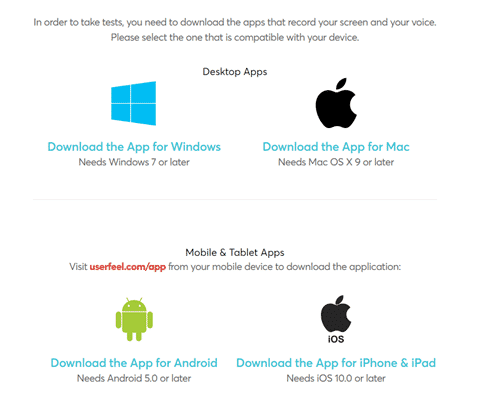
After you verify your account, you get the link to download the Userfeel program for Windows or Mac, or the app for your phone. Log in, and you see all the tests you can do. First you must finish the unpaid qualification test.
During a test, you talk about what you think of the site, and some tests ask you to do things like try to make a purchase. You do not complete the purchase; you give feedback on how it went. Then you upload the results through the program.
Userfeel then takes a few days to review your work. Once it is approved, you are paid.
Paid surveysSome countries only
In some countries, you sometimes find paid surveys. Userfeel is not a survey site, so there are not many. Survey earnings can take up to 6 weeks to show in your account, which is very slow. If you want surveys, use other platforms.
How much can you make?
How much you get per test depends on its length. These are the rates Userfeel lists:
| Test length | Pay |
|---|---|
| 5 minutes | $3 |
| 20 minutes | $10 |
| 40 minutes | $20 |
| 60 minutes | $30 |
That is pretty decent pay for the time. But how much you earn depends mostly on how many tests you are invited to, and you will usually not get tests very often. Since site testing is the only real way to earn, the earning potential is not that high, in my opinion.
How you get paid
| Method | Minimum | Speed |
|---|---|---|
| PayPal | None | Around 1 week after the test, once your work is approved |
| Bank account (certain countries) | None | Around 1 week after the test, once your work is approved |
You choose your payment method in the registration form. You do not have to reach a threshold: once Userfeel approves your work, it pays you right away.
Overall, the payment method is very convenient, in my opinion. For more sites like this, see the top survey sites that pay via PayPal.
What readers told me
This review has 7 comments since 2020: 4 from readers and 3 replies from me. These are the things readers wrote about.
A reader noticed Userfeel processes running at Windows startup and uninstalled the program. Another reader decided not to install it.
You do not have to find clients yourself. Userfeel invites you to tests in your native language and the languages you marked as fluent.
“After installing it I noticed there are 5 new processes constantly running in the background whenever I start Windows with the name “Userfeel”. It installs itself as a start up process that is never turned off”
Mikael: Thanks for sharing your experiences.
“I got a mail which said that I qualified with a 5/5 rating. … It looks like I have to bring the owners of the websites who want their websites to be tested ON MY OWN.”
Mikael: No, you do not have to bring in the work yourself. … You will be invited to tests in your native language as well as other languages you have marked as fluent in your profile.
Userfeel alternatives I have reviewed
| Site | Best for | Min. cashout | My rating |
|---|---|---|---|
| UserTesting | Record your screen and voice while you use websites, paid through PayPal | None; paid per test | 3.4 / 5 |
| User Interviews | Research studies that pay well, mostly for US residents | None; paid per study | 3.4 / 5 |
| Testbirds | Test websites and apps, a nice secondary site | €6 | 3.0 / 5 |
| dscout | Paid missions through PayPal, with limited slots | None; paid per mission | 2.8 / 5 |
Want simpler tasks? See the top survey sites in your country or the best survey sites. The tasks there are not as complicated as on Userfeel.
How I scored Userfeel
I use the same 100-point system for every platform. See how I test and rate.
Userfeel scores 58 out of 100. If you want simpler tasks and more regular work, see these sites first.
See the best alternativesUserfeel FAQ
Is Userfeel a scam?
No. Userfeel is legit and pays you for testing websites. But tests do not come often, and you are only paid for approved work.
How much does Userfeel pay?
Userfeel lists $3 for a 5-minute test, $10 for 20 minutes, $20 for 40 minutes and $30 for 60 minutes.
How does Userfeel pay?
Through PayPal, or to your bank account in certain countries. There is no threshold. You usually see the money in your account around 1 week after the test.
Is the qualification test paid?
No. But it gives you your first rating, which decides how often you get paid tests, so take it seriously.
Do I need a microphone?
Yes. Tests involve recording audio while you talk about the site. Your phone has a built-in microphone, so the app is an option if your computer does not.
Is there a Userfeel app?
Yes, for Android and iOS. Go to userfeel.com/app on your phone to get the right download link.
Who can join Userfeel?
Anyone aged 18 or older. Userfeel is available globally.
How do I contact Userfeel support?
Check the FAQ page first. Otherwise, use the contact form under the Contact Us tab on the website.
Who checked Userfeel for this review
Founder of PaidFromSurveys.com since 2016. Mikael has tested hundreds of survey and GPT sites and shares his tests with 555K+ subscribers on YouTube (October 2026).
If you have any comments, questions, or experiences with Userfeel, I would love to hear from you in a comment below.
You might want to be careful with this. After installing it I noticed there are 5 new processes constantly running in the background whenever I start Windows with the name “Userfeel”. It installs itself as a start up process that is never turned off, god knows what it’s doing, recording the websites you visit? Logging your keyboard presses? Snatching up passwords? Anything is possible since you have no reason to trust this company, but you’re basically giving them the keys to your house and telling them to do what they want. Wait, it’s worse, they took the keys without making you aware of the access you’re giving them to your house.
This seems sketchy, I’m uninstalling and running a full system scan.
Thanks for sharing your experiences.
NOTHING IS FOR FREE, GOOD TO KNOW, I WON’T INSTALL THIS SCAM
Hey Mikael!!!
I had a query.
I had given a qualification test on userfeel (somewhere in mid July, I guess) through my laptop & I was asked to give the test in my local language (I went with Hindi).
Fast forward to today, I got a mail which said that I qualified with a 5/5 rating.
Now, the next thing written in that mail is something I am confused with.
“Anyone using your personal link will be directed to userfeel website home page with a cookie that will have you as a preferred tester when they order.”
So this link is something I have to put on my website or blog OR share on FB, LinkedIn, Twitter with a personal “Hire me”.
I thought that I would get tests from their side on their website & what is with the whole “link with a personal Hire me” message.
It looks like I have to bring the owners of the websites who want their websites to be tested ON MY OWN.
Secondly, will I get an option to give tests in language other than Hindi?
Except for my native language, every other language that I can converse in was present there when you give qualification tests.
Even before during the qualification test, I had specifically asked them whether I have to do the test in my local language(Hindi) OR whether I have to continue with English.
And to, till this date, I haven’t got a reply from their side which suggests that their customer support isn’t really good.
Do you have any idea about this?
Thanks for the update about this.
No, you do not have to bring in the work yourself. I am pretty sure that link is just an extra link they give to people and hope they will share it and get more customers that way. But they will send a message like all other sites when there is an available test.
You will be invited to tests in your native language as well as other languages you have marked as fluent in your profile.
I hope this helps.
I Give a sages any website…
I do not understand?