
I checked out the TaskBucks app to see if downloading apps for rewards is worth your time. It is legit, but the rewards are tiny and you can withdraw at most ₹10 a week, so you can never take out everything you earn. Below is what I found, and which sites I recommend instead.

Tested by Mikael (EarnWithMike)Founder and lead testerMikael founded PaidFromSurveys in 2016 and has personally tested hundreds of survey and GPT sites since then. He shows his tests and payment proof to 555K+ subscribers on his YouTube channel, EarnWithMike. He checked TaskBucks himself and does not earn a commission from it.Learn more about Mikael
Legit, but tiny rewards and you cannot withdraw everything you earn
An Android app for India that pays around ₹10 to ₹20 per app you download. Paytm withdrawals are capped at ₹10 a week.
On this page
The short answer
TaskBucks is legit. It is a Get-Paid-To (GPT) app that really pays you for completing its tasks, mostly downloading other apps.
But you typically earn only ₹10 to ₹20 per app, there are not a lot of offers, and you can withdraw at most ₹10 per week to Paytm, so you can never withdraw everything you earn. It is only available in India and only on Android. I don’t recommend you invest your time in it.
- A simple way to earn extra cash
- Mobile recharges without a threshold
- Limited earning opportunities
- Low rewards: around ₹10 to ₹20 per app
- You cannot withdraw all of your earnings: at most ₹10 a week to Paytm, plus a ₹2 fee
- The app is a bit spammy, with pop-up ads
- India only, and Android only
My experience with TaskBucks
I checked out the TaskBucks app, its app download offers, the referral program and the withdrawal options. This is what I looked at, and what I did not test.
- First checked
- March 2021Review first published Mar 28, 2021
- Latest retest
- Checked: offers, payouts, support
- Device
- AndroidTaskBucks has no iOS app
- Typical reward
- ₹10 to ₹20 per appFew offers when I checked
- The registration in the app
- The app download offers and their instructions
- The referral program and the prize draw
- The withdrawal options and limits
- A withdrawal. My review does not show a payout from TaskBucks.
- Winning the prize draw
TaskBucks at a glance
| What it is | Get-Paid-To (GPT) app that pays you to download other apps |
|---|---|
| Cost to join | Free |
| Ways to earn | Downloading apps, referrals, a prize draw |
| Typical reward | Around ₹10 to ₹20 per app you download |
| Referral reward | ₹25 per referral. No commission on their earnings. |
| Payout methods | Paytm, or a mobile recharge for prepaid SIM cards |
| Minimum cashout | ₹30 for Paytm. No threshold for a mobile recharge. |
| Withdrawal limit | Paytm: ₹5 or ₹10 per withdrawal, at most ₹10 per week, plus a ₹2 fee |
| Apps | Android only. No iOS app and no desktop version. |
| Where you can join | India only |
| Support | Email: wecare@taskbucks.work |
Is TaskBucks legit and safe?
Yes, TaskBucks is legit. It will really pay you for completing its tasks. But that doesn’t mean it is worth your time. Here is what you should know before you install it.
- You cannot withdraw everything you earn
To withdraw to Paytm, you need at least ₹30. But you can only withdraw ₹5 or ₹10 per transaction, and at most ₹10 per week. So there will always be an amount left in your balance.
- Very low rewards
You typically earn around ₹10 to ₹20 per app you download. ₹20 was only worth around $0.28 when I wrote this review, and there aren’t a lot of offers.
- Follow every step of an offer
Each offer shows its instructions. If you miss one step, you will not complete the task and you won’t earn any rewards.
- Spammy app, and it uses a lot of data
Ads pop up from time to time. Downloading apps uses a lot of data, so use WiFi if you have a prepaid SIM card.
- A ₹2 fee on every withdrawal
A ₹2 transaction fee is added to every amount you withdraw to Paytm.
My takeOverall, I don’t recommend you invest your time in this app. There are simply far better options out there if you want to earn extra cash from your mobile device. The fact that you can’t withdraw all your earnings is what makes it a bad option.
TaskBucks pays very little and caps your withdrawals. These sites in your country pay better and let you withdraw everything.
See the best sites in your countryHow you earn on TaskBucks
There are 3 ways to earn. Downloading apps is the main one. Tap one to read more.
Downloading apps₹10 to ₹20 each
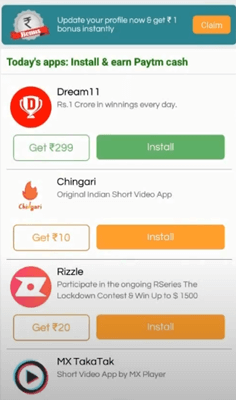
When you log in, you immediately see all the apps you can download to earn rewards. Each offer shows which app to download and the general instructions. Press the offer to see the full details.
Follow all the instructions to the letter. If you miss one step, you won’t earn the reward. Once you complete the task, the reward is added to your TaskBucks balance.
Referral program₹25 per referral
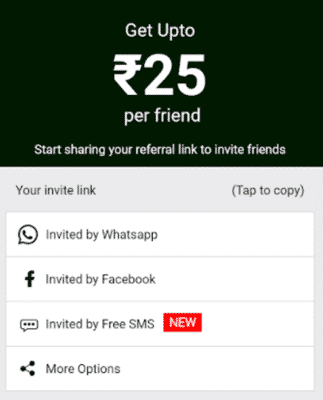
Share your invite link. When someone signs up through it, they become your referral and you earn ₹25.
You don’t get a commission on your referrals’ earnings, like most other GPT apps and sites offer. So this is not very rewarding, in my opinion.
Prize drawLuck only
TaskBucks holds prize draws regularly, but it gives little information about them. Usually, you can win ₹100 or more if you are lucky.
You get 1 entry for every app download offer you complete and 1 entry for every referral. There is no guarantee you win anything, so think of it as a bonus for being active.
How much can you make?
It mostly depends on how active you are. You typically earn around ₹10 to ₹20 per app you download. That’s a very small amount: ₹20 was only worth around $0.28 when I wrote this review.
There aren’t a lot of app download offers either, at least from what I observed when I was checking out the app. So it will take you months just to earn a decent amount.
On top of that, the app limits how much you can withdraw per week. The earning potential is very low, and you are better off with GPT apps or sites that pay better.
Payout methods, minimums and limits
| Method | Minimum | Limit and fee |
|---|---|---|
| Paytm | ₹30 | ₹5 or ₹10 per withdrawal, at most ₹10 per week. ₹2 fee per withdrawal. |
| Mobile recharge (prepaid SIM cards) | No threshold | Only useful if you use a prepaid SIM card |
Because the threshold is higher than what you can withdraw per week, there will always be an amount left in your balance. That makes the payment system very bad, in my opinion.
If you want a better way to get paid, see the top sites that pay via PayPal.
How to join TaskBucks
TaskBucks is only available in India, and the app only works on Android. There is no iOS app and no desktop version.
Download and install the app, go through the short registration, and log in to start earning.
Live in India and want more and better ways to earn? See the top survey sites in India.
What readers told me
This review has 6 comments since 2023: 3 from readers and 3 replies from me.
Readers asked how to withdraw their TaskBucks earnings. You withdraw to Paytm from ₹30, at most ₹10 a week, or take a mobile recharge. See the payout table above.
A reader wrote that TaskBucks is a real site. It is legit, but the rewards are very low.
“Pls guide me how to withdraw my earning from Task Bucks Wallet .”
Mikael: I explain everything in the review above.
“You did not talk about how to withdraw.”
Mikael: There is a whole section in the review above that is called “How do you get paid”. There I explain exactly how you withdraw and get paid.
TaskBucks alternatives I have tested
| Site | Best for | Min. cashout | My rating |
|---|---|---|---|
| PrizeRebel | Many surveys and offers, and excellent support | 500 points ($5) for PayPal | 4.8 / 5 |
| ySense | Well-paid surveys, open in most countries | $10 for PayPal | 4.0 / 5 |
| Pawns | Games, surveys and passive earning | $5 | 4.4 / 5 |
| Toluna Influencers | Surveys and an app in many countries | Usually around $7 to $10, by country | 4.2 / 5 |
| TimeBucks | Tasks and other ways to earn in almost every country | $3 | 3.9 / 5 |
See also the best survey sites in India and the top survey apps. Outside India? See the top survey and GPT sites in your country. You will find a site you can join wherever you live.
How I scored TaskBucks
I use the same 100-point system for every platform. See how I test and rate.
TaskBucks scores 30 out of 100. I recommend these sites instead.
See the best sites in your countryTaskBucks FAQ
Is TaskBucks legit?
Yes. TaskBucks will really pay you for completing its tasks. But the rewards are very low, and you cannot withdraw all your earnings.
How do I withdraw from TaskBucks?
To Paytm, once you have at least ₹30. You can withdraw ₹5 or ₹10 per transaction and at most ₹10 per week, plus a ₹2 fee. You can also take a mobile recharge without a threshold.
How much can I earn with TaskBucks?
Typically around ₹10 to ₹20 per app you download, and there aren’t a lot of offers.
Who can join TaskBucks?
Only people in India.
Is TaskBucks available on iPhone or desktop?
No. TaskBucks only works on Android devices.
How do I contact TaskBucks?
Email wecare@taskbucks.work.
Who checked TaskBucks for this review
Founder of PaidFromSurveys.com since 2016. Mikael has tested hundreds of survey and GPT sites and shares his tests with 555K+ subscribers on YouTube (October 2026).
If you have any comments, questions, or experiences with TaskBucks, I would love to hear from you in a comment below.
This is real site
I explain everything in the review above.
You did not talk about how to withdraw.
Through more light ?️?️?? sir.
There is a whole section in the review above that is called “How do you get paid”. There I explain exactly how you withdraw and get paid.
Pls guide me how to withdraw my earning from Task Bucks Wallet .
I explain everything in the review above.