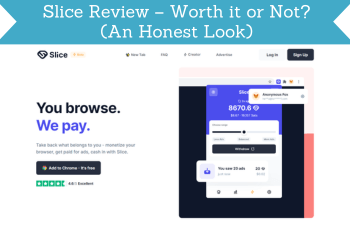
I tested Slice, a browser extension that pays you to see ads while you browse. It is legit and takes no effort, but you earn very little, and it needs wide access to the websites you visit. Below is what I found, and which apps I recommend instead.

Tested by Mikael (EarnWithMike)Founder and lead testerMikael founded PaidFromSurveys in 2016 and has personally tested hundreds of survey and GPT sites since then. He shows his tests and payment proof to 555K+ subscribers on his YouTube channel, EarnWithMike. He tested Slice himself and does not earn a commission from it.Learn more about Mikael
Last retested · First published
Legit and effortless, but you earn very little
A Chrome and Firefox extension that shows ads while you browse. Around $3 to $5 a month at most, paid to PayPal or Bitcoin Lightning.
On this page
The short answer
Slice is a legit browser extension, since you can earn cash when you use it. You install it in Chrome or Firefox, browse like you normally would, and earn when it shows you ads.
But you will not earn a lot: based on my testing, around $3 to $5 per month at most. The extension asks for permission to edit all information on all websites, and it can break some sites. Personally, I do not feel safe with an intrusive extension like this.
- Offers a passive way of earning
- Offers payment via PayPal
- Available more or less worldwide
- No payout threshold
- Works with Chrome and Firefox, and next to your ad blocker
- Low rewards
- The extension can cause issues with certain sites
- Asks for permission to edit all information on all websites
- A transaction fee on every withdrawal
- Not available on mobile
My experience with Slice
I signed up, installed the extension and browsed with it to see how much it pays. This is what I tested, and what I did not test.
- First tested
- May 2023Review first published May 9, 2023
- Latest retest
- Checked: earning, payouts, support
- Device
- ComputerSlice is not available on mobile
- What to expect
- Around $3 to $5 a month at mostBased on my testing
- Signing up and setting up the extension
- Browsing with the extension on, and the ads it shows
- The earnings shown in the extension and the payout options
- The referral program
- A payout. My review does not show a cashout from Slice.
- Support. My review does not show that I used the contact form.
My Slice test on video
The video below shows exactly how Slice works. The screenshots are from my test.
Screenshots from my test
Slice at a glance
| What it is | Browser extension that shows you ads while you browse and pays you for them |
|---|---|
| Cost to join | Free |
| Ways to earn | Browsing the web with the extension on, referral program |
| Currency | Slices: 1,000 Slices = $1 |
| What to expect | Around $3 to $5 per month at most, based on my testing |
| Minimum cashout | No threshold, but every withdrawal has a transaction fee |
| Payout methods | PayPal and Bitcoin Lightning |
| Browsers | Chrome and Firefox on a computer. Not available on mobile. |
| Permissions | Asks to edit all information on all websites. Slice says it does not access sensitive information. |
| Where you can join | More or less worldwide, as far as I can tell |
| Support | FAQ page and a contact form on the website |
Is Slice legit and safe?
Slice is legit, since you can earn cash when you use it. But that does not automatically mean it is worth using. Here is what you should know.
- It can edit all websites you visit
During setup, Slice asks for permission to edit all information on all websites. Slice says it will not access the sensitive information you give a website. I am not a developer, so I cannot say whether it is safe, but I do not feel safe with an extension like this.
- It can break some websites
In my experience, extensions like this mess up some websites, like banking sites. If that happens, turn Slice off while you are on that site.
- Very low earnings
Based on my testing, the most you can expect is around $3 to $5 per month. Slice’s own website says you will not earn a lot.
- It can hurt content creators
Slice can take away ad earnings from the sites you visit if they do not partner with Slice. If creators cannot earn from ads, they may stop making the free content you use.
- Still in beta when I tested
Slice was in its beta stage when I wrote this review, so you may run into bugs or errors.
My takeIn my opinion, Slice can be a decent way to earn extra cash, if you set your expectations properly. It will not earn you much, but it is effortless. Personally, this kind of extension is not my cup of tea. I do not like extensions that can edit the data of all websites you use. That is my personal preference: if you are comfortable with Slice, you can use it.
Want passive income without an extension on every website? See the passive income apps I recommend.
See the best passive income appsHow you earn on Slice
There are 2 ways to earn. Browsing with the extension on is the main one. Tap one to read more.
Browsing the webMain earner
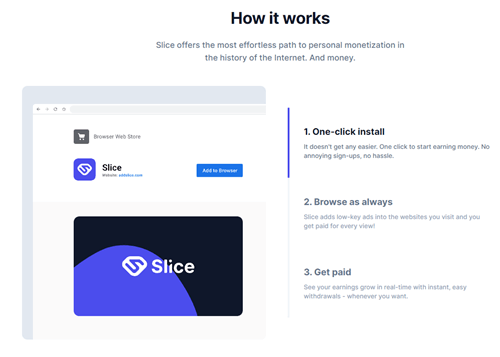
Register, install the extension in Chrome or Firefox, and complete the setup. Then turn it on and browse like you normally would. Slice shows ads on the sites you visit. After a few seconds, you earn the reward, so do not close the ad right away.
Your ad blocker does not interfere: it blocks the website’s own ads, not the ads Slice shows. You earn Slices, the currency of the platform.
If a site does not work properly with Slice on, turn the extension off while you are on that site.
Referral program1,000 Slices ($1) each

Share your invite link. When someone installs the extension through it and signs up, you get 1,000 Slices, which is $1. It is straightforward, but quite limited compared to many other referral programs.
Check Out the Top Passive Income Apps
How much can you make?
You will not be able to earn a lot from Slice. Its own website says the same thing.
Based on my testing, the most you can expect is around $3 to $5 per month. That is quite low, but not surprising. Other platforms with the same kind of opportunity do not have high earning potential either.
The only advantage is that you earn passively. You do not have to do anything special. It is only a decent option if you adjust your expectations.
Payout methods and fees
| Method | Minimum | Fee |
|---|---|---|
| PayPal | No threshold | A transaction fee on every withdrawal |
| Bitcoin Lightning | No threshold | A transaction fee on every withdrawal |
You see the value of your Slices when you click the extension icon. You do not need to reach a threshold, but every withdrawal has a transaction fee, so I would only withdraw when you have earned a significant amount. Slice says it is working on more payout options.
If you want more apps and sites with PayPal, see the top sites that pay via PayPal.
Who can join, and how
Slice does not say exactly which countries it is available in. As far as I can tell, it is available more or less worldwide, since you do not need to live anywhere specific to earn.
Go to the Slice website, click the sign-up button and fill out the form. Slice emails you a confirmation code, which you use when you log in to the extension during setup.
Slice is not available on mobile, because not enough mobile browsers support extensions. On a Mac, use Chrome or Firefox, not Safari.
What readers told me
This review has 2 comments since July 2023: 1 from a reader and 1 reply from me.
A reader’s security extension blocked the Slice website as a blacklisted URL. The reader did not know if it was a false positive.
“as soon as I tried to access their site, my Avast Online Security & Privacy extension wouldn’t allow me, identifying the site as an URL:blacklist. I don’t know if this is a false positive…”
Mikael: Thanks for sharing your experiences.
Slice alternatives I have tested
| Site | Best for | Min. cashout | My rating |
|---|---|---|---|
| Pawns | Passive earning by sharing internet, plus surveys and games | $5 | 4.4 / 5 |
| Honeygain | Completely passive: share your unused internet | $20 PayPal; $0.50 through JumpTask | 3.7 / 5 |
| EarnApp | Passive earning from your unused internet, PayPal and Wise | $2.50 PayPal and Wise | 3.1 / 5 |
See also the best passive income apps. If you prefer to be more active, see the top survey and GPT sites in your country.
How I scored Slice
I use the same 100-point system for every platform. See how I test and rate.
Slice scores 40 out of 100. I recommend these passive income apps instead.
See the best passive income appsSlice FAQ
Is Slice a scam?
No. Slice is a legit browser extension, since you can earn cash when you use it. But you earn very little.
How much can you earn with Slice?
Based on my testing, around $3 to $5 per month at most.
How does Slice pay?
Through PayPal or Bitcoin Lightning. There is no threshold, but every withdrawal has a transaction fee.
Is Slice safe?
Slice asks for permission to edit all information on all websites, and says it does not access sensitive information. I cannot say whether it is safe, but I do not feel safe with an extension like this.
Does Slice work with an ad blocker?
Yes. Your ad blocker blocks the website’s own ads, not the ads Slice shows.
Can I use Slice on my phone?
No. Slice is not available on mobile. Use it in Chrome or Firefox on a computer.
Which countries can join Slice?
Slice does not say. As far as I can tell, it is available more or less worldwide.
How do I contact Slice?
Check the FAQ page first, or use the contact form on the website.
Who tested Slice for this review
Founder of PaidFromSurveys.com since 2016. Mikael has tested hundreds of survey and GPT sites and shares his tests with 555K+ subscribers on YouTube (October 2026).
If you have any comments, questions, or experiences with Slice, I would love to hear from you in a comment below.
Hello,
I’ve never used this extension, but as soon as I tried to access their site, my Avast Online Security & Privacy extension wouldn’t allow me, identifying the site as an URL:blacklist. I don’t know if this is a false positive, but I take it as a serious warning that should not be ignored lightly.
Have you written anything about another similar extension called Search for a Cause by gladly.io that can also be manually adjusted in the browser? They also claim that through them it is possible to earn some money (I don’t believe that there is any higher income) and to help protect animals and the environment, and although the search is done from their site, the search results are pulled from Yahoo!.
With best regards,
Nikola
Thanks for sharing your experiences.
And no, I have not checked that platform yet but will write it on my list of platforms to test and potentially review. Thanks.