Viggle has shut down
The earning app called Viggle has shut down and is no longer a way to earn some extra money on the side. You cannot join or earn on it now.
There is now another app called Viggle that can be used to create AI videos. That is NOT the app this review is about. I keep my review below as a record. The sites I would pick instead are further down.
Viggle was a US app that rewarded you for watching TV shows and listening to music. The earning app has now shut down. I tested it myself before that. Below is what I found, and which sites I would pick instead.

Tested by Mikael (EarnWithMike)Founder and lead testerMikael founded PaidFromSurveys in 2016 and has personally tested hundreds of survey and GPT sites since then. He shows his tests and payment proof to 555K+ subscribers on his YouTube channel, EarnWithMike. He tested Viggle himself and does not earn a commission from it.Learn more about Mikael
Viggle has shut down
The Viggle earning app has shut down, so you can no longer earn on it. When it was running, it paid very little, with a cap of $3 a month.
On this page
The short answer
The Viggle earning app has shut down. You can no longer join or earn on it. The Viggle app for AI videos is a different app.
When it was running, it was legit, because you really earned rewards for watching TV shows and listening to music. But the rewards were very low: you could earn at most $3 a month, the payout went through a second rewards platform, Perk, and you had to keep interacting with the app while you earned.
- An interesting way to earn rewards
- The Viggle earning app has shut down
- Low rewards
- A cap on how much you could earn per month
- A convoluted payment system
- Only available for Android devices when I reviewed it
My experience with Viggle
I installed Viggle, signed up and went through its earning options and payment section before it shut down. This is what I did myself, and what I did not test.
- First tested
- May 2023Review first published May 22, 2023
- Status
- Shut downThe earning app is no longer a way to earn
- Device
- AndroidThe website said Android and iOS, but I could not find it in the Apple App Store
- Monthly cap
- 60,000 Viggle PointsEqual to $3 in cash
- Installing the app and signing up
- Checking in to earn while watching TV shows and listening to music
- The trivia and quests
- The payment section and the Perk conversion
- The support section in the app
- A payout. My review does not show a cashout from Viggle or Perk.
- How fast support replied.
Inside Viggle: my screenshots
These screenshots are from the Viggle earning app, from when it was still running.
Screenshots from my account
The Viggle earning app has shut down. The top sites in your country are still open, and they pay a lot better.
See the best alternativesViggle at a glance
| What it was | An entertainment rewards app that paid you for watching TV shows and listening to music |
|---|---|
| Status | Shut down. The Viggle app for AI videos is a different app. |
| Ways to earn | Watching featured TV shows, listening to music, trivia and quests |
| Pay | 1 Viggle Point per minute of a featured TV show |
| Point value | 20 Viggle Points = 1 Perk Point · 1,000 Perk Points = $1 |
| Monthly cap | 60,000 Viggle Points, equal to $3 |
| Payout methods | Gift cards, PayPal or a Perkplastic debit card, through Perk |
| App | Mobile only. Only on Google Play when I reviewed it. |
| Where you could join | Only the US, as far as I could tell |
| Minimum age | 13 |
| Support | A support section in the app. No FAQ, help page or contact form on the website. |
Was Viggle legit and safe?
The Viggle earning app has shut down, so you can no longer join or earn on it. When it was running, it was legit, because you really earned rewards. These were the catches.
- It has shut down
The earning app called Viggle has shut down. The Viggle app for AI videos is a different app.
- At most $3 a month
You could earn at most 60,000 Viggle Points per month, which was $3 in cash. I seldom see reward apps that limit how much you can earn.
- A convoluted payment system
You had to convert your Viggle Points to Perk Points and then use Perk, a separate rewards platform, to redeem them.
- You had to keep interacting
During commercial breaks, the app showed ads you had to close when they finished. You could not just leave your phone next to the TV.
My takeThe Viggle earning app has shut down, so it is no longer an option. Even when it was running, I did not think it was worth the time and effort, because it paid very little and capped what you could earn. See the alternatives below.
How you earned on Viggle
There were 2 ways to earn. Watching TV shows and listening to music was the main one. Tap one to read more.
Watching TV shows and listening to music1 point per minute
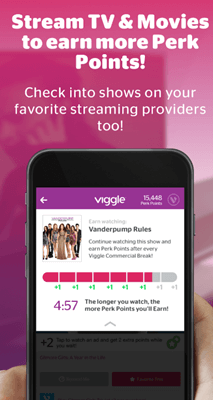
You opened the app, picked a featured TV show or music, and tapped “Check In”. This turned on your phone’s microphone so Viggle could listen to what you were watching on your TV, computer or another device.
You earned 1 Viggle Point per minute of a featured TV show, also while ads played. It worked a lot like the Media Rewards app.
Usually during commercial breaks, Viggle showed ads you had to close when they finished. That told Viggle you were still using the app and had not left your phone next to the TV.
Trivia and questsSmall rewards
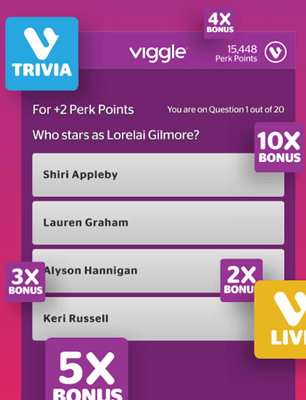
You answered trivia questions or did short quests, such as watching a certain TV show or listening to a specific song, and received Viggle Points for each one.
There were not many of these, and they did not pay a lot, but they took little effort and time.
Check Out the Top Passive Income Apps
How much could you make?
Very little. Even if you managed to earn the maximum Viggle Points in a month, which was highly unlikely, you could only earn $3.
That is a very small amount for a month’s work. And because you had to interact with the app while earning, it was not a passive way to earn either. Your time was better spent on other apps or sites.
How Viggle paid
You first converted your Viggle Points to Perk Points in the app’s payment section, at 20 Viggle Points to 1 Perk Point. Perk is a company that runs rewards programs. Then you redeemed the Perk Points on Perk.
| Method | Rate | Notes |
|---|---|---|
| Gift cards | Through Perk | Various gift cards |
| PayPal | 1,000 Perk Points = $1 | Cash |
| Perkplastic debit card | 1,000 Perk Points = $1 | Cash |
For apps and sites with a simple payment method, see the top sites that pay via PayPal.
Viggle alternatives I have tested
| Site | Best for | Min. cashout | My rating |
|---|---|---|---|
| Swagbucks | Many daily ways to earn, on the web and in an app | PayPal around $5 | 4.3 / 5 |
| Freecash | Offers, games and surveys | $5 | 4.2 / 5 |
| InboxDollars | Many ways to earn, for US residents | $15 the first time, then $10 | 3.9 / 5 |
| Media Rewards | Points for TV, YouTube and radio ad exposure, invite-only | None, monthly prize draws | 2.8 / 5 |
For apps that earn in the background, see the top passive income apps. For the best options where you live, see the top survey and GPT sites in your country.
How I scored Viggle
I use the same 100-point system for every platform. See how I test and rate.
Viggle scored 30 out of 100 before it shut down. To earn today, see these sites.
See the best alternativesViggle FAQ
Is the Viggle earning app still running?
No. The earning app called Viggle has shut down and is no longer a way to earn extra money. You cannot join or earn on it now.
Is the Viggle AI video app the same app?
No. The Viggle app for creating AI videos is a different app. This review is about the earning app called Viggle, which has shut down.
Was Viggle legit?
Yes. You really earned rewards for watching TV shows and listening to music. But you could earn at most $3 a month, so I did not think it was worth it.
How did Viggle pay?
You converted Viggle Points to Perk Points (20 to 1) and redeemed them on Perk for gift cards, PayPal or a Perkplastic debit card. 1,000 Perk Points were worth $1.
Who could join Viggle?
No one can join now, because it has shut down. When it was running, it was only available in the US, as far as I could tell, from age 13.
What are good alternatives to Viggle?
See Swagbucks, Freecash, InboxDollars or Media Rewards in the alternatives above, or the top survey and GPT sites in your country.
Who tested Viggle for this review
Founder of PaidFromSurveys.com since 2016. Mikael has tested hundreds of survey and GPT sites and shares his tests with 555K+ subscribers on YouTube (October 2026).
If you have any comments, questions, or experiences with Viggle, I would love to hear from you in a comment below.
Please which other recommendable app or website can I actually withdraw from and can also access Timewall through it?
Which country do you live in?
La RDC Congo Kinshasa
You can check out this list of the best international sites which are the ones you should go for.